Start with every plan at once.
Hadamard gates put the six qubits into an equal superposition. All 64 plans share the same amplitude, 1/8, and the same phase, so each is equally likely.
|ψ₀⟩ = |+⟩⊗6 = ⅛ Σₓ |x⟩
QubitFlow simulates a QAOA circuit exactly in your browser, then grades its answer against a greedy planner and every possible plan. Every run publishes its seed, angles and scores, so anyone can reproduce it to the last bit.
Quantum algorithm simulated on your device. No quantum hardware.
Each cell is one simulated circuit at a different pair of angles, painted in the order the search tried them. Brighter cells scored better.
The probability of each plan at the best angles found so far.
Test figures from the reports of 2026-10-11 · see exactly what was run
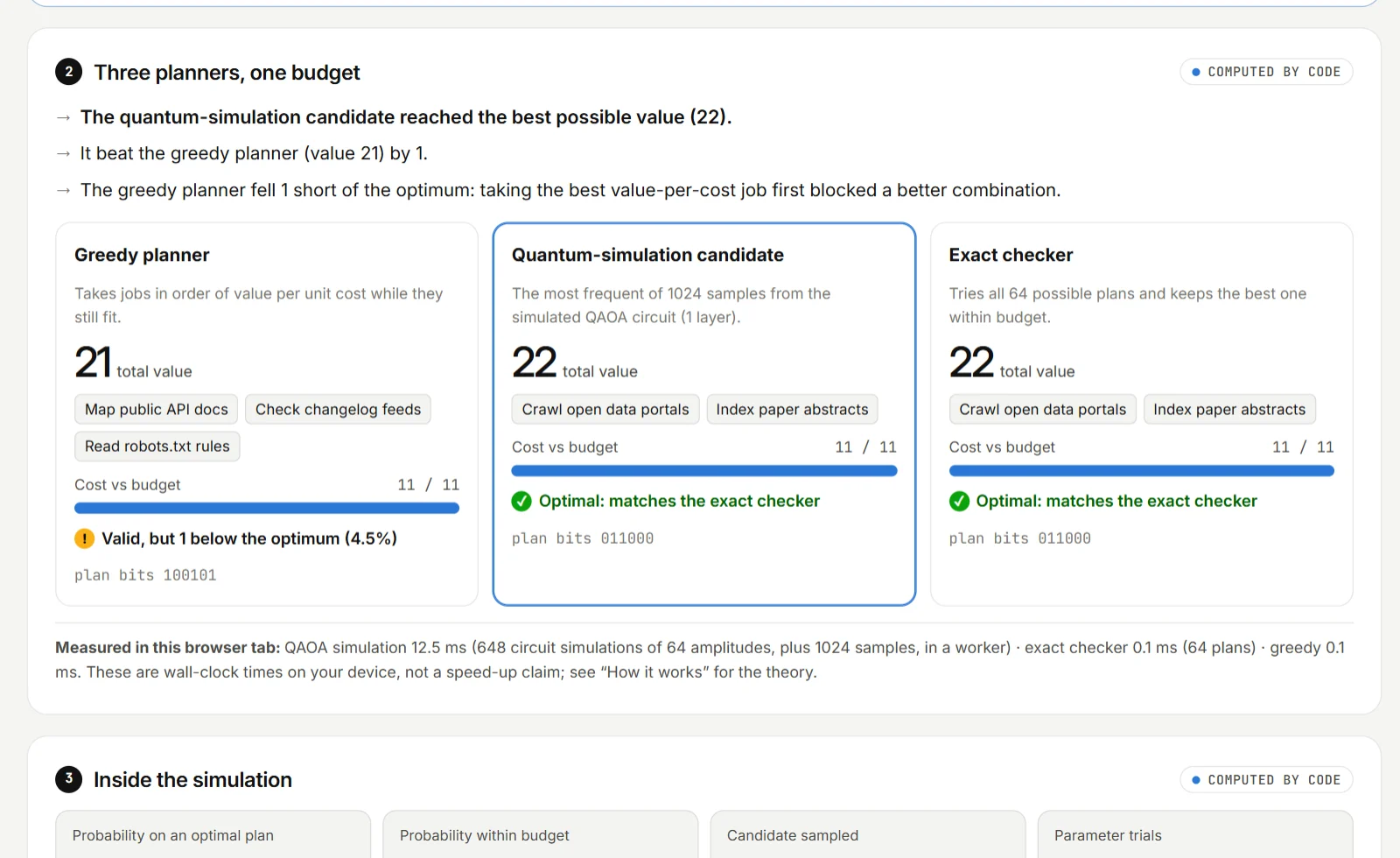
Six research tasks for a crawler squad. Each time you move the slider, the simulated circuit, the greedy planner and the exact checker all run again, here in your browser.
Open this run in the labThe jobs, costs and values are a saved example with hypothetical planning values. Nothing is crawled or measured.
Each square is one of the 64 possible plans. The arrow inside is that plan’s complex amplitude: its length is the amplitude’s size and its direction is the phase. As you scroll, the page applies the real circuit.
Hadamard gates put the six qubits into an equal superposition. All 64 plans share the same amplitude, 1/8, and the same phase, so each is equally likely.
|ψ₀⟩ = |+⟩⊗6 = ⅛ Σₓ |x⟩
The cost layer turns each arrow by an angle set by that plan’s score, with over-budget plans penalised. Directions now differ, but no probability has moved yet.
|ψ₁⟩ = e−iγH |ψ₀⟩
The mixer lets amplitude flow between plans that differ by one job. Arrows that line up reinforce and arrows that oppose cancel, so probability gathers on some plans.
|ψ₂⟩ = e−iβΣXⱼ |ψ₁⟩
Each shot returns one plan, drawn at random in proportion to its probability. A seeded generator makes the shots repeatable; the plan drawn most often is the circuit’s answer.
candidate = most frequent of 1,024 seeded shots
An exact checker tries all 64 plans and grades the circuit’s answer, alongside a simple greedy planner.
Every part of QubitFlow leaves something you can inspect: the amplitudes, the plans, the run fingerprint and the tests.
No shortcuts inside the circuit: the full state vector is evolved exactly, then sampled. These are the example’s final probabilities, from most to least likely.
The exact checker enumerates all of them, so the best answer is always known.
A deterministic search, seeded sampling and bundled trigonometry give bit-identical runs in every browser.
SHA-256 of this run’s inputs, angles, sample counts and candidate, computed in your browser.
Static files and your device. A strict security policy blocks every other connection.
An optional small model drafts tables and rewords results. Code sets every number, and its sentences are checked.
How often each planner found the optimum on 300 hold-out problems.
The circuit is compared with a separate numpy implementation, and the browser build is driven end to end in Chrome.
On 300 random problems never used for tuning, the circuit’s candidate finds the optimum less often than a simple greedy planner. We publish that, with the code that reproduces it.
Recompute it in your browserFigures are locked by an automated test that reruns the benchmark, and the Benchmarks page reruns them on your device. The plain-mean search is the textbook objective; under a large penalty it collapses toward the empty plan, which is why QubitFlow uses CVaR.
Bring your own jobs and budget. The lab runs the circuit, shows every angle it tried, and lets anyone check the result.
Each opens in the lab and runs immediately. All are saved examples with hypothetical values, chosen to show different behaviour.
QubitFlow did not invent these methods. It implements them carefully and shows its work.
Full method and referencesUsed for the circuit: alternating cost and mixer layers.
Used for the search objective, CVaR with α = 0.3.
Used for INTERP, which starts deeper circuits from shallower ones.
Used for refining the circuit’s angles after the grid search.
What QubitFlow is, what it is not, and how to check it for yourself.
Everything is a classical simulation of a quantum algorithm, and it is labelled that way wherever it appears.
Simulating 2ⁿ amplitudes cannot beat simply checking all 2ⁿ plans, which QubitFlow also does, on every run.
Every figure here is computed live in your browser, locked by an automated test, or recorded from a real test run.
No. It simulates a quantum algorithm exactly on your own device, by storing all 2ⁿ complex amplitudes and applying the circuit to them. That is why it is limited to six jobs, and why every page says “quantum algorithm simulated on your device”.
Because a shallow QAOA circuit is an approximate method. On the published hold-out set the circuit’s candidate is optimal about seven times in ten, while greedy is optimal about five times in six. QubitFlow shows the comparison on every run instead of hiding it.
No. There is no backend. Your jobs, budgets and settings are processed in your browser. If you switch on the optional AI, your browser downloads the model files from Hugging Face and jsDelivr, but your text stays on your device.
Export the run from the lab and drop it on the Verification page, or run npm run reproduce on it. Both re-run the simulation with the same inputs and seed and compare the angles, every sample count and the candidate. Runs are bit-identical across browsers.
It can draft a job table from a sentence and reword the result. It cannot set a score, a constraint or a verdict. Drafts are schema-checked and must be confirmed by you, and each reworded sentence is checked against the computed facts.
QubitFlow is a demonstration for exploration and education, not advice. The exact checker always tells you the true optimum for your inputs, but the inputs themselves are only as good as your estimates.
Four to six jobs and a budget is all it takes. No account, nothing to install.